

這篇文章會用 TDD 手刻 myChunked、myWindowed、myZipWithNext,搞懂區塊切割和滑動視窗的實作方式
| Kotlin | C# LINQ | 備註 |
|---|---|---|
chunked(size) |
Chunk(size) (.NET 6+) |
C# 很晚才加入 |
windowed(size, step) |
無直接對應 | |
zipWithNext() |
無直接對應 | 等同 windowed(2) 的特例 |
C# 到 .NET 6 才有 Chunk,而且沒有 windowed 和 zipWithNext。這兩個在資料分析場景很常用,Kotlin 從標準函式庫就支援
先用圖理解差異
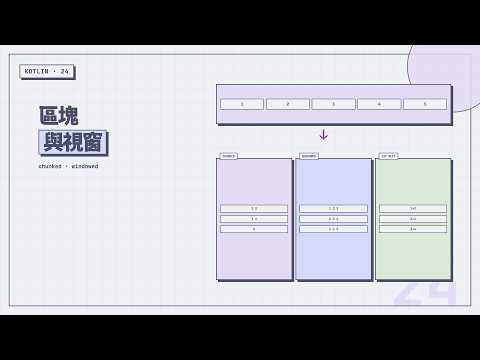
原始:[1, 2, 3, 4, 5]

chunked(2):[1,2] [3,4] [5]     — 不重疊,每塊獨立
windowed(3):[1,2,3] [2,3,4] [3,4,5]  — 有重疊,視窗滑動
chunked 把集合切成不重疊的區塊,像切蛋糕一刀一刀下去。最後一塊可能不到指定大小
windowed 用固定大小的視窗從頭滑到尾,每次移動 step 步。預設 step = 1,所以相鄰視窗會大量重疊
windowed 在時間序列、訊號處理是熟面孔。常見用法
prices.windowed(7) { it.average() } — 七天平均prices.zipWithNext { a, b -> b - a } — 相鄰兩天差值tokens.windowed(3) — 連續 3 個 token 當 featurezipWithNext 就是把 windowed(2) 包成專用版,只處理「相鄰元素」這個高頻 idiom
employees 的薪水資料也能用來看相鄰變化。先按薪水排序,再用 zipWithNext 算每一階和下一階的差距
employees
    .sortedBy { it.salary }
    .zipWithNext { current, next -> next.name to (next.salary - current.salary) }
// [(Eve, 5000), (Charlie, 5000), (Bob, 7000), (Diana, 6000), (Alice, 7000), (Grace, 7000)]
如果要做固定大小的批次處理,chunked 也很自然
employees.chunked(3) { group -> group.map { it.name } }
// [[Alice, Bob, Charlie], [Diana, Eve, Frank], [Grace]]
C# 沒有 windowed,要做 moving average 得自己用 Skip + Take 配 Select,或借第三方函式庫。Kotlin 把這類 pattern 直接包進 stdlib,常見場景一行搞定
@Test
fun `chunked into pairs`() {
    val numbers = listOf(1, 2, 3, 4, 5)
    val result = numbers.myChunked(2)
    assertEquals(listOf(listOf(1, 2), listOf(3, 4), listOf(5)), result)
}

@Test
fun `chunked exact division`() {
    val numbers = listOf(1, 2, 3, 4, 5, 6)
    val result = numbers.myChunked(3)
    assertEquals(listOf(listOf(1, 2, 3), listOf(4, 5, 6)), result)
}

@Test
fun `chunked with transform`() {
    val numbers = listOf(1, 2, 3, 4, 5)
    val result = numbers.myChunked(2) { it.sum() }
    assertEquals(listOf(3, 7, 5), result)
}

@Test
fun `chunked zero throws`() {
    assertThrows(IllegalArgumentException::class.java) {
        listOf(1, 2, 3).myChunked(0)
    }
}
帶 transform 的版本很實用。chunked(2) { it.sum() } 先切成 [1,2]、[3,4]、[5],再對每塊做 sum,得到 [3, 7, 5]。分頁處理、批次計算都會用到
fun <T> Iterable<T>.myChunked(size: Int): List<List<T>> {
    require(size > 0) { "Size $size must be greater than zero." }
    val result = ArrayList<List<T>>()
    val chunk = ArrayList<T>(size)
    for (element in this) {
        chunk.add(element)
        if (chunk.size == size) {
            result.add(ArrayList(chunk))
            chunk.clear()
        }
    }
    if (chunk.isNotEmpty()) {
        result.add(chunk)
    }
    return result
}
用一個暫存的 chunk 收集元素,滿了就加進結果然後清空。迴圈結束後如果 chunk 裡還有剩餘(最後一塊不滿),也加進結果
ArrayList(chunk) 是複製一份。如果直接 result.add(chunk) 再 chunk.clear(),加進去的那份也會被清空(因為是同一個物件)
帶 transform 的版本差別不大,只是把 result.add(ArrayList(chunk)) 換成 result.add(transform(ArrayList(chunk)))
這裡要先說明一件事,免得跟前面幾篇的內容不完全一樣,這篇帶 Lambda 參數的函式裡,myChunked 和 myWindowed 都不加 inline,只有等一下的 myZipWithNext 會加。stdlib 也是這樣分的。原因在後面「與 stdlib 原始碼比較」會講到的視窗重用機制 —— chunked / windowed 的 transform 版底層會把同一個緩衝區重複交給 transform,實作比表面上複雜,不是「一個迴圈裡直接呼叫 Lambda」那種適合 inline 的形狀。zipWithNext 沒有這層機制,就是單純的迴圈,所以標了 inline
fun <T, R> Iterable<T>.myChunked(size: Int, transform: (List<T>) -> R): List<R> {
    require(size > 0) { "Size $size must be greater than zero." }
    val result = ArrayList<R>()
    val chunk = ArrayList<T>(size)
    for (element in this) {
        chunk.add(element)
        if (chunk.size == size) {
            result.add(transform(ArrayList(chunk)))
            chunk.clear()
        }
    }
    if (chunk.isNotEmpty()) {
        result.add(transform(chunk))
    }
    return result
}
暫存一塊、滿了就送出、最後補上剩餘,這個迴圈已經是最終形狀,沒什麼好再改的。stdlib 走的是另一條路,把切塊的工作整個交給 windowed,這點留到後面「與 stdlib 原始碼比較」一節再對照
@Test
fun `windowed size 3`() {
    val numbers = listOf(1, 2, 3, 4, 5)
    val result = numbers.myWindowed(3)
    assertEquals(listOf(listOf(1, 2, 3), listOf(2, 3, 4), listOf(3, 4, 5)), result)
}

@Test
fun `windowed with step 2`() {
    val numbers = listOf(1, 2, 3, 4, 5)
    val result = numbers.myWindowed(3, step = 2)
    assertEquals(listOf(listOf(1, 2, 3), listOf(3, 4, 5)), result)
}

@Test
fun `windowed with partial windows`() {
    val numbers = listOf(1, 2, 3, 4, 5)
    val result = numbers.myWindowed(3, step = 2, partialWindows = true)
    assertEquals(listOf(listOf(1, 2, 3), listOf(3, 4, 5), listOf(5)), result)
}

@Test
fun `windowed with transform for moving average`() {
    val numbers = listOf(1.0, 2.0, 3.0, 4.0, 5.0)
    val result = numbers.myWindowed(3) { it.average() }
    assertEquals(listOf(2.0, 3.0, 4.0), result)
}

@Test
fun `windowed zero size throws`() {
    assertThrows(IllegalArgumentException::class.java) {
        listOf(1, 2, 3).myWindowed(0)
    }
}
partialWindows 控制末尾不足 size 的視窗要不要保留。預設 false 丟掉,設 true 保留
跟 chunked 一樣,size 或 step 給 0(甚至負數)沒有意義,所以也補一個會丟 IllegalArgumentException 的測試,把例外路徑也測到
移動平均是 windowed 搭配 transform 的典型用法,windowed(3) { it.average() } 可以算出三日移動平均
使用 stdlib 的 transform 多載時要注意:傳入 Lambda 的視窗 List 只在該次呼叫期間有效,實作可能重複使用同一個 buffer。Lambda 應該直接算出結果;如果要把視窗保存到外部,先呼叫 toList() 複製。本篇的 myWindowed 為了讓實作容易閱讀,每個視窗都建立新的 ArrayList,這點與 stdlib 的最佳化不同
fun <T> Iterable<T>.myWindowed(
    size: Int,
    step: Int = 1,
    partialWindows: Boolean = false
): List<List<T>> {
    require(size > 0 && step > 0) { "Size $size and step $step must be greater than zero." }
    val source = this.toList()
    val result = ArrayList<List<T>>()
    var index = 0
    while (index < source.size) {
        val end = (index + size).coerceAtMost(source.size)
        val window = source.subList(index, end)
        if (window.size == size || partialWindows) {
            result.add(ArrayList(window))
        }
        index += step
    }
    return result
}
先 toList() 把 Iterable 轉成 List,因為 windowed 需要隨機存取(用 subList 取區間)
coerceAtMost 平常比較少用到,它是 Kotlin 的夾值函式:a.coerceAtMost(b) 表示「a 最多只能到 b,超過就取 b」,效果等同 minOf(a, b),只是寫成方法鏈的形式,接在算式後面讀起來比較順。同一組還有夾下限的 coerceAtLeast(day 22 的 dropLast 用它把負數夾成 0),以及上下限一起夾的 coerceIn
這裡用它是為了保護 subList。視窗滑到尾端時 index + size 會超出 source.size,直接拿去 subList 會丟 IndexOutOfBoundsException;夾成 source.size 之後,末尾拿到的就是一個長度不足的視窗。接下來判斷視窗滿了(size 等於要求的大小)就加進結果,不滿的話看 partialWindows 決定要不要加
跟 chunked 的差異在步進:chunked 的 step 等於 size(不重疊),windowed 的 step 預設 1(大量重疊)。其實 chunked(n) 等於 windowed(n, step = n, partialWindows = true)
帶 transform 的版本一樣只是多收一個轉換函式,把每個視窗先丟給 transform 再放進結果。移動平均的那個測試就是靠它通過
fun <T, R> Iterable<T>.myWindowed(
    size: Int,
    step: Int = 1,
    partialWindows: Boolean = false,
    transform: (List<T>) -> R
): List<R> {
    require(size > 0 && step > 0) { "Size $size and step $step must be greater than zero." }
    val source = this.toList()
    val result = ArrayList<R>()
    var index = 0
    while (index < source.size) {
        val end = (index + size).coerceAtMost(source.size)
        val window = source.subList(index, end)
        if (window.size == size || partialWindows) {
            result.add(transform(ArrayList(window)))
        }
        index += step
    }
    return result
}
stdlib 在這裡多做了一步:先依 size、step 算出大概會有幾個視窗,用這個數字一次把 ArrayList 的容量開好,省掉迴圈中反覆擴容、搬資料的成本。容量怎麼算留到「與 stdlib 原始碼比較」一節細說,這裡先知道「視窗數是可以預先算出來的」就好
@Test
fun `zipWithNext pairs`() {
    val numbers = listOf(1, 2, 3, 4)
    val result = numbers.myZipWithNext()
    assertEquals(listOf(1 to 2, 2 to 3, 3 to 4), result)
}

@Test
fun `zipWithNext with transform for differences`() {
    val numbers = listOf(1, 3, 6, 10)
    val result = numbers.myZipWithNext { a, b -> b - a }
    assertEquals(listOf(2, 3, 4), result)
}

@Test
fun `zipWithNext single element returns empty`() {
    val single = listOf(42)
    val result = single.myZipWithNext()
    assertEquals(emptyList<Pair<Int, Int>>(), result)
}
zipWithNext { a, b -> b - a } 算相鄰元素的差。這在分析時間序列資料(每日變化量、成長率)的時候很方便
fun <T> Iterable<T>.myZipWithNext(): List<Pair<T, T>> {
    val iterator = this.iterator()
    if (!iterator.hasNext()) {
        return emptyList()
    }
    val result = ArrayList<Pair<T, T>>()
    var current = iterator.next()
    while (iterator.hasNext()) {
        val next = iterator.next()
        result.add(current to next)
        current = next
    }
    return result
}
用 iterator 追蹤「目前的」和「下一個」元素。每次疊代把 current 和 next 配對,然後 next 變成新的 current
跟 day 13 的 zip 概念一樣是配對,但 zip 是兩個不同集合的元素配對,zipWithNext 是同一個集合的相鄰元素配對
帶 transform 的版本不用先湊出 Pair 再轉換,直接把相鄰的 current 和 next 丟給 transform。zipWithNext { a, b -> b - a } 那個算相鄰差的測試就是走這條路
inline fun <T, R> Iterable<T>.myZipWithNext(transform: (a: T, b: T) -> R): List<R> {
    val iterator = this.iterator()
    if (!iterator.hasNext()) {
        return emptyList()
    }
    val result = ArrayList<R>()
    var current = iterator.next()
    while (iterator.hasNext()) {
        val next = iterator.next()
        result.add(transform(current, next))
        current = next
    }
    return result
}
兩個多載各寫了一份幾乎相同的迴圈,差別只在「配對之後做什麼」。既然帶 transform 的版本更通用,不帶 transform 的那個就可以委派過去,傳入「把兩個元素湊成 Pair」當轉換
fun <T> Iterable<T>.myZipWithNext(): List<Pair<T, T>> {
    return myZipWithNext { a, b -> a to b }
}
迴圈只剩一份,之後要調整疊代邏輯也只要改一個地方。stdlib 正是這樣安排的,原始碼留到後面「與 stdlib 原始碼比較」一節再看
// 分頁:每頁 20 筆
val pages = items.chunked(20)

// 三日移動平均
val movingAvg = prices.windowed(3) { it.average() }

// 檢查相鄰元素是否遞增
val isIncreasing = numbers.zipWithNext { a, b -> a < b }.all { it }
原始碼位置:kotlin.collections 的 _Collections.kt
stdlib 的 chunked 沒有自己一套迴圈,一行就轉呼叫 windowed
public fun <T> Iterable<T>.chunked(size: Int): List<List<T>> {
    return windowed(size, size, partialWindows = true)
}
chunked(n) 就是 windowed(n, step = n, partialWindows = true)。我們分開實作是為了教學,把切塊邏輯講清楚;但 stdlib 直接重用 windowed,省掉一份重複的迴圈
前面 myChunked 的 Refactor 沒辦法做這件事,因為當時 myWindowed 還沒寫。現在兩個都有了,myChunked 就可以改寫
fun <T> Iterable<T>.myChunked(size: Int): List<List<T>> {
    return myWindowed(size, size, partialWindows = true)
}
myChunked 那組測試照樣會過,切塊邏輯整個由 myWindowed 負責。要留哪一個版本要看取捨,手寫迴圈那版讀起來直接,不必先懂 windowed 的三個參數;委派這版少一份重複,windowed 改了 chunked 自動跟上
windowed 這邊的差別在容量預估。我們的版本是 ArrayList() 開預設容量,邊跑邊擴容;stdlib 在走 RandomAccess List 這條路徑時,會先算好結果會有幾個視窗,一次把容量開到位。它的公式是
val resultCapacity = thisSize / step + if (thisSize % step == 0) 0 else 1
也就是「整個長度除以 step,除不盡再加一」。注意這個數字是「會起頭幾個視窗」(每個 step 起一個視窗),不是「完整視窗有幾個」。為什麼用起頭數而不是完整視窗數?因為開了 partialWindows 時末尾不足的視窗也會佔一格,用這個上界開容量最穩。算對容量,ArrayList 就不必在迴圈裡反覆擴容、搬資料
zipWithNext 這邊,stdlib 的不帶 transform 版本就是帶 transform 版本的特例
public fun <T> Iterable<T>.zipWithNext(): List<Pair<T, T>> {
    return zipWithNext { a, b -> a to b }
}
主要邏輯放在帶 transform 的多載,不帶 transform 的版本只套用「湊成 Pair」這個預設轉換,也就是前面 Refactor 說的委派寫法。至於它跟 windowed 的關係,zipWithNext() 等於 windowed(2) { (a, b) -> a to b },只是用 iterator 直接走相鄰元素,不必先 toList(),對只能單向疊代的序列更省
切片篇到這裡結束
take/drop(固定數量) → takeWhile/dropWhile(條件式) → chunked/windowed/zipWithNext(區塊與視窗)
從最簡單的「取前 n 個」到「用滑動視窗掃描」,複雜度逐步升高但核心邏輯都是在 for 迴圈裡控制「要不要加進結果」
| 手刻函式 | 篇號 | 用途 |
|---|---|---|
myTake |
day 22 | 取前 n 個元素 |
myTakeLast |
day 22 | 取後 n 個元素 |
myDrop |
day 22 | 丟掉前 n 個,回傳剩下的 |
myDropLast |
day 22 | 丟掉後 n 個,回傳剩下的 |
myTakeWhile |
day 23 | 從頭取到第一個不符條件為止 |
myDropWhile |
day 23 | 從頭丟到第一個不符條件,留下其餘 |
myChunked |
day 24 | 切成不重疊的固定大小區塊 |
myWindowed |
day 24 | 固定大小視窗滑動掃描,可設步進 |
myZipWithNext |
day 24 | 相鄰元素兩兩配對 |
chunked 切塊、windowed 滑動視窗、zipWithNext 配對相鄰,三個函式底層其實同源,chunked 和 zipWithNext 都能用 windowed 表達。看懂這層關係,往後遇到區塊或視窗的需求就知道該往哪個方向想
day 25 進入集合運算篇。distinct / distinctBy 去除重複元素,靠的是 HashSet 的特性
同步刊登於 Blog
圖片來源:AI 產生


 iThome鐵人賽
 看影片追技術